Home › Blog › Emerging Tech & IT Trends
Key Differences Between Edge Computing and Cloud Computing
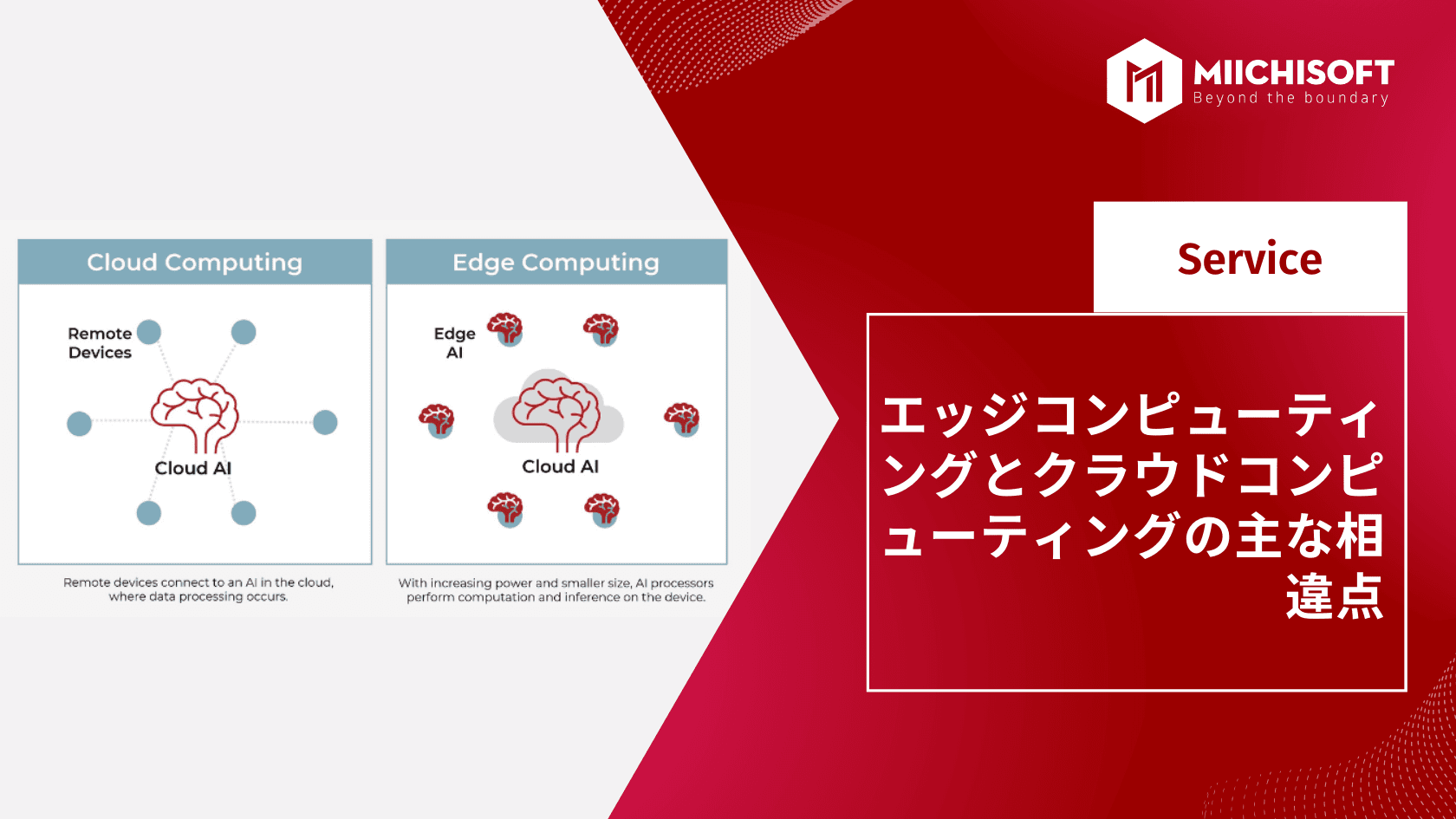
To understand cloud computing and edge computing, it's important to know how they differ. When comparing cloud computing and edge computing, the most important difference is where the data is processed.
In this section, we'll take a closer look at edge computing and cloud computing.
1. What Is Edge Computing?
Edge computing is a data management approach that places data close to where it's created. This allows for quick responses to shifting demand and helps prevent bottlenecks when accessing information.
1.1. Benefits of Edge Computing
① Reduced Latency
The massive volume of data flowing into the cloud can create a kind of traffic jam. Cloud-based platforms and analytics tools can sort, clean, and structure data, and then run analysis on it.
Edge computing, however, takes some of that load off the cloud platform, reducing latency.
Analyzing data locally shortens the round-trip time from the cloud back to the business using that information, freeing up the cloud-based platform for more important tasks like analysis.
Reduced bandwidth — just as edge computing reduces latency, it also reduces bandwidth usage. Since more data is processed, analyzed, and stored locally, less data needs to be sent to the cloud. Reduced bandwidth means fewer cloud storage subscription upgrades, so reducing data flow also helps minimize costs for users.
② Security
The security of cloud-based data storage has advanced dramatically in recent years and will likely keep improving. Edge computing also means less data is concentrated in cloud storage.
By processing and storing some data on the edge network, you can minimize the "all eggs in one basket" scenario. The edge filters out redundant, extraneous, and unnecessary data, sending only the most important data to the cloud.
③ Scalability and Versatility
As edge devices become more common, they're increasingly available on cloud-based platforms. OEM equipment makers are adding native edge capabilities to their devices, making it easier to scale systems. This growing adoption also allows local networks to keep functioning even if an upstream or downstream node goes down.
1.2. Drawbacks of Edge Computing
① Cost and Storage
Even when cloud storage is cheap, additional costs arise at the local end — mostly to secure storage capacity on edge devices.
Edge computing also incurs costs for replacing or upgrading legacy IT network infrastructure to handle edge devices and storage. For some companies, the cost of migrating to an edge network may feel comparable to the cost of deploying and maintaining traditional IT infrastructure.
② Data Loss
The benefits of edge computing come with risks too. When deploying it, systems need to be carefully planned and programmed to avoid data loss. Many edge computing devices discard irrelevant data after collection, but if that discarded data turns out to be relevant, it's lost for good, leaving gaps in cloud-based analysis.
③ Security
Just as there are security benefits at the cloud or enterprise level, there are security risks at the local level too. A cloud-based provider with excellent security doesn't mean much to a business if its local network can still be breached.
IT departments have struggled with this issue for years, and that same vigilance — or lack of it — extends to new edge networks. Cloud-based security keeps getting stronger, but breaches are usually caused by human error or by the applications and passwords used locally.
2. What Is Cloud Computing?
Cloud computing is a method of storing and processing data on remote servers instead of locally. With cloud computing, users can access their files anytime, anywhere, but in exchange, they lose control over where that data ends up once it's uploaded to a server owned by another company or organization.
2.1 Benefits of Cloud Computing
① Cost Savings
It's a basic financial principle that profit comes from earning more than you spend. Know what never gets cheaper? Pretty much anything related to computers. For most businesses, this is the number one item on any list of cloud computing pros and cons.
A good server can cost thousands of dollars for the hardware alone. On top of that, you need to maintain the software and hardware.
You also need a secure room to house the server. If you don't already have one, you'll need to build it on-site. Servers must be kept cool at all times to run properly, which drives up air conditioning costs.
Buying software licenses for high-end programs can also be enough to bankrupt a company.
Cloud computing solves all of these problems. Cloud providers take on all the hassle of server infrastructure, maintenance, and utility management.
Cloud-based applications usually cost a fraction of what locally installed software would cost.
They also come with the benefit of paying only for the server time and space you actually use.
② Security
Cloud computing data breaches have made headlines, but there's plenty of debate over why cloud computing can actually be more secure than in-house computing.
Chief among the reasons is that cloud providers are subject to stricter oversight and must follow established standards. Every company has a legal obligation to protect customer information, but how they do so is a matter of the company's own reputation.
Data stored in the cloud is less exposed to theft by employees. If someone has physical access to the machine where information is stored, stealing it is easy. Cloud computing puts some distance between your data and any potentially disgruntled employees.
Because their business depends on cloud computing, cloud providers work hard to keep security protocols and software up to date at all times. Most cloud providers likely have dedicated staff specializing in digital/network security. How many small and medium-sized businesses can say the same?
③ Reliability
Say you have a server. What happens if the hard disk fails? Unless you've invested in RAID (Redundant Array of Independent Disks), all your data and server-based applications become unavailable right away.
In short, it's a nightmare scenario.
Cloud providers survive on redundancy. Your data isn't simply stored on one server — it's stored across multiple servers.
Some providers even store it on servers in multiple locations, in case a catastrophic failure hits one server farm.
In other words, a single hardware failure won't disrupt your business. Reliability when accessing your data and services is also excellent. Most providers guarantee 99.99% uptime.
2.2. Drawbacks of Cloud Computing
① Downtime
The biggest drawback of cloud computing is downtime — not server downtime, but internet connection downtime.
While internet access is down, there's nothing you can do with the cloud.
A mobile data plan can temporarily solve this problem. Cell phone service often keeps working even during internet outages or power failures. Of course, data plans have caps, and mobile device battery life is limited too.
But if there's a power outage, isn't there probably something more important to worry about than accessing your cloud services?
② Security
At one level, security is a benefit of cloud computing, for the reasons mentioned earlier. But on another level, security can also be a drawback.
Think of it this way. If you have a door lock, a security system, and security cameras at home, you have all the infrastructure needed to stay safe. But keeping your home safe also requires you to actually lock the door, arm the security system, and keep the cameras powered on.
With most security systems, the user is the weak link. Without basic digital security practices, cloud computing is about as safe as leaving your laptop open in a coffee shop.
Security is one of those areas where whether it counts as a benefit or drawback of cloud computing depends on your point of view.
③ Cloud Services Can Shut Down
In mature industries, you're usually dealing with a handful of well-known companies offering proven, reliable services. Cloud computing is still a young industry, with many companies competing for business. A cloud provider could run into financial trouble and shut down permanently.
The more important the cloud is to your business, the bigger the blow a provider's sudden shutdown would deal. This problem is compounded by cloud vendor lock-in, since migrating from one cloud vendor to another is difficult and costly.
Think of it like renting a warehouse and filling it with your goods. Once you've rented the warehouse and filled it up, moving everything out is a logistical nightmare.
Now imagine how much worse it would be if the warehouse owner went bankrupt and you lost access to the warehouse entirely. That's essentially what it would be like if a cloud provider shut down tomorrow without warning.
3. Comparison Table: Edge Computing vs. Cloud Computing

3.1 Data Distribution
With the spread of IoT, edge computing has developed as a distributed computing infrastructure. IoT devices frequently generate data that needs to be processed quickly or analyzed in real time. Cloud computing addresses this by using a central cloud-based location (usually a data center) that's physically distant from the device.
Edge computing, on the other hand, eliminates the need to uplink data to the cloud by handling computation, analysis, and storage close to the device where the data is collected.
3.2 Focus
Edge computing focuses on real-time data processing and communication between devices.
Cloud computing focuses on storing and processing large volumes of unstructured data all at once.
Cloud computing is used for processing data that isn't time-driven, while edge computing is used for time-driven data. In remote locations with poor or no connectivity to a centralized location, edge computing is chosen over cloud computing due to latency, among other factors. Edge computing offers an ideal answer for the local storage needed in such places, functioning like a small data center.
3.3 Real-Time Interaction
Edge computing enables real-time interaction with users, since data is processed close to where it's generated, making real-time interaction possible.
Cloud computing can only occasionally deliver this level of interaction. In many cases, because data is centralized, real-time interaction is difficult.
3.4 Data Processing
Data processing involves collecting digital data and manipulating it to produce meaningful information. Any change to information that an observer can detect falls under data processing.
The edge processes data faster, in larger volumes, and closer to where it originates, delivering action-driven solutions in real time. Compared to the traditional model of concentrating processing power in an on-premises data center, it has several distinctive traits.
One of a network's characteristic selling points is deterministic behavior, whereas cloud services often exhibit non-deterministic performance, with no guaranteed real-time response, as a result of sharing computing and network resources.
3.5 Use Cases
IaaS, SaaS, hybrid cloud, multi-cloud, and virtual machines for software testing and development are all major use cases for cloud computing. Edge computing can be used for big data analytics, cloud gaming, IoT, and predictive maintenance.
3.6 Cost-Effectiveness
Unlike cloud computing, edge computing requires a dedicated system for each edge node. Depending on how many of these nodes exist within a company, the cost can end up significantly higher than cloud services.
4. Conclusion
Now that we understand the difference between cloud computing and edge computing, it's clear that the arrival of cloud computing has, surprisingly, dramatically advanced how companies use distributed networks, servers, and related cloud computing technologies. Still, that alone isn't enough to solve more pressing problems, such as slow response times, excessive latency, and limited resources on the end-user side.
Edge computing complements cloud and on-premises computing, enabling new customer experiences. Edge computing is seen as a physical boundary, and experts believe it's only natural that everyone will eventually gravitate toward the edge, as it lets developers deliver content with the lowest possible latency and the highest possible quality, providing the ideal user experience.
Related Articles
AI News Flash | Google Integrates Gemini into Chrome
Top 3 Workflow Automation Platforms: Is n8n, Dify AI, or Make the Right Fit for Your Business?
AI News Flash | xAI Officially Unveils Its Most Powerful Multimodal Model, "Grok 4.0"
AI News Flash | Gemini AI's Android Integration Expands, Turned On by Default Regardless of User Settings
AI News Flash | ChatGPT Is Evolving From a "Q&A AI" Into a "Multifunctional Work Partner"