




When deploying a chatbot with Dify, the first critical question isn’t “how to build it” but rather whether to choose Dify Cloud or Dify Self-hosted. In reality, these two models differ significantly in cost, security, deployment speed, and scalability.
Dify Cloud cost is typically predictable with fixed monthly fees, while Dify Self-hosted cost depends on infrastructure, personnel, and operational expenses. Making the wrong choice from the start can cause businesses to overspend by 30-50% of their budget or face migration within 6-12 months.
This article compares Dify Cloud vs Dify Self-hosted costs from a total cost of ownership (TCO) perspective, covering platform, infrastructure, and operational personnel expenses. This will help you identify the option that fits your company’s budget and technical capabilities.
Overview: How Do Dify Cloud vs Dify Self-hosted Differ??
Dify Cloud: Managed Service
Dify Cloud is a SaaS model operated by the Dify team. Businesses simply need to register an account, select a service plan, and start building their chatbot. The entire infrastructure- including servers, databases, security, backups, and version updates- is managed by Dify. Additionally, costs are calculated on a monthly or annual subscription basis, making budgeting predictable without requiring upfront infrastructure investment.
The biggest advantage of Dify Cloud is rapid time-to-value. Businesses can focus on building and optimizing their chatbot instead of managing systems. This model suits companies that want quick deployment or lack a dedicated technical team.
Dify Self-hosted: Deploy and Manage Yourself
Self-hosted is the option to deploy Dify’s open-source code on infrastructure owned or rented by your business. With this approach, you have complete control over everything from source code and databases to operational methods and security.
However, deploying this option requires businesses to invest in servers, installation, security, backups, monitoring, and system updates themselves. This demands an experienced DevOps or System Admin team.
Self-hosted is the right choice for businesses that:
- Have high data security requirements
- Need deep system customization
- Plan long-term deployment and want to optimize TCO
Moreover, Self-hosted deployment takes longer and requires continuous operational resources.
Quick Comparison of Both Options
| Criteria | Dify Cloud | Dify Self-hosted |
| Setup time | 5-10 minutes | 1-3 weeks |
| Technical requirements | Not needed | Requires DevOps/SysAdmin |
| Control & customization | Limited | Full control |
| Security | Managed by Dify (SOC 2) | Self-managed |
| Suitable for | SMEs, startups, quick pilots | Enterprises, high security needs |
To learn more about building chatbots with Dify, check out Dify Chatbot Pricing: Complete Guide to Deployment & Operating Costs. ‘
Special Offer from Miichisoft – 50% Off Quick Start Package
Considering Dify Cloud vs Self-hosted but unsure which option fits your needs? The Quick Start package helps you set up Dify in 2 weeks and evaluate it practically before making a major investment.
Quick Start Package includes:
- Consultation on choosing the right option (Cloud/Self-hosted)
- Complete Dify environment setup
- Building 1 pilot chatbot
- Internal team training (1 session)
Original price: $600 → Special price: $300 (save 50%).
Limited to the first 10 registered businesses
Offer ends: February 15, 2026
Detailed Comparison of 4 Cost Categories: Dify Cloud vs Dify Self-hosted
To realistically compare Dify Cloud and Dify Self-hosted costs, you need to look at four main cost categories:
- Platform/license costs
- Infrastructure costs
- AI model API costs
- Operational personnel costs
In many cases, businesses only focus on license fees and infrastructure, while AI usage and operations are two areas that get underestimated. This is why actual deployment costs often exceed initial budgets.
Cost 1: Platform/License Fee
Platform or license fee is what businesses pay to use the Dify platform. This directly affects feature scope, usage limits, and the level of technical support included.
This is typically the most visible cost component when comparing Dify Cloud and Dify Self-hosted.
Platform Fee for Dify Cloud
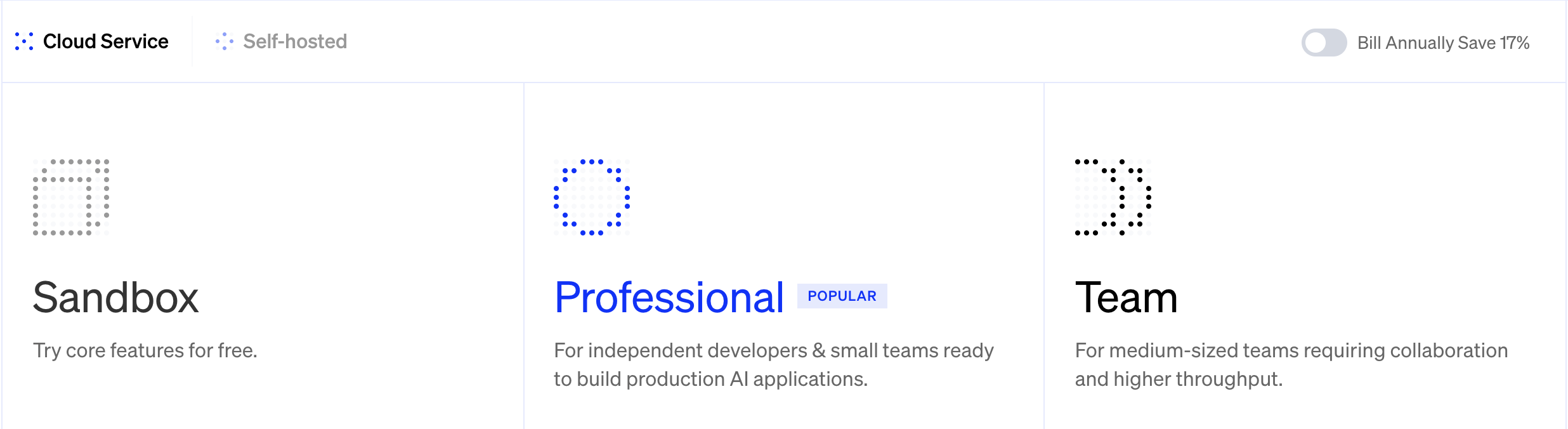
Dify Cloud currently offers three main plans designed for different stages of business development.
| Plan | Cost | Target Users | Main Strengths | Notes |
| Sandbox | Free | Individuals, initial testing | Free to get familiar with Dify, quick setup | 200 message credits are one-time only, not suitable for long-term use |
| Professional | $59/month $590/year | Small teams of 2-3 people, PoC or internal pilot | Low cost, sufficient for testing real use cases | 5,000 credits/month is quite low, easy to exhaust with frequent use |
| Team | $159/month | SME businesses, official production deployment | High message credits and user count, low per-user cost | Need to manage usage to avoid exceeding quota when chatbot has many interactions |
Self-hosted Cost: Free Software, Not Free Operations
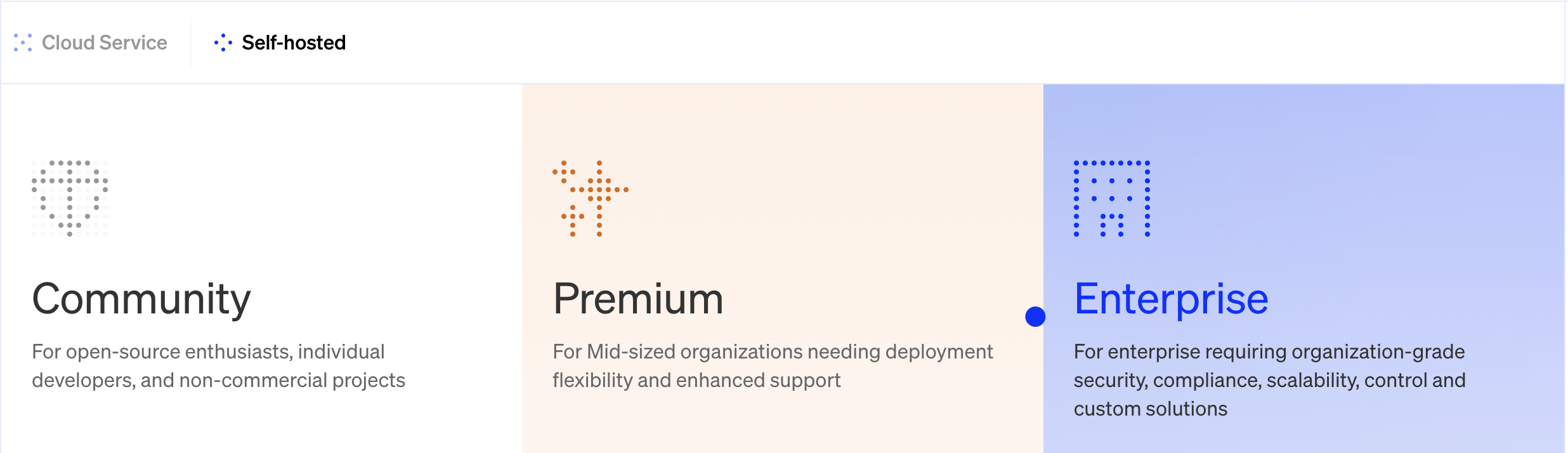
With the self-hosted model, Dify currently has three license tiers: Community (open source), Premium, and Enterprise. Community is the free version, allowing businesses to download, deploy, and use Dify on their own infrastructure without licensing costs. This version meets most basic needs like building chatbots, workflows, and knowledge bases.
However, “free” here only applies to the source code. The real Dify Self-hosted cost lies in the effort to deploy, operate, and maintain the system. In real projects, getting a Dify Self-hosted system to a stable operational state typically requires 40-80 hours of work from an experienced DevOps engineer. With less experienced teams, this time can extend significantly due to dealing with infrastructure configuration, security, monitoring, and backup/restore procedures.
Beyond Community edition, Dify also offers Premium and Enterprise packages for the self-hosted model. These are not free and are sold as commercial licenses. They suit businesses with advanced needs such as valid commercial licenses for production environments, SSO, multi-workspace management, SLA, or enterprise-level security and compliance requirements. While still deployed on private infrastructure (self-hosted), costs now include not just operations but also licensing fees from Dify.
Learn more: Is dify safe for enterprise deployment? 3 dify security risks & measures to keep your data protected
Cost 2: Infrastructure
Infrastructure includes all the technical infrastructure behind the scenes that keeps your chatbot running: servers to process requests, databases to store data, storage for documents and conversations, plus backup and monitoring systems to ensure stability.
Unlike platform/license fees, infrastructure is the cost to “feed” the system daily. The more users your chatbot has, the larger the data, or the heavier the AI processing, the greater the infrastructure demand.
Dify Cloud: No Self-Managed Infrastructure Costs
With Dify Cloud, businesses don’t need to invest in and operate their own infrastructure. All servers, databases, storage, network, backup, and monitoring are managed by Dify and included in the monthly subscription fee.
The biggest benefit of this model is stable and predictable costs. Within the limits of each service plan, monthly costs don’t directly depend on whether you have 10 or 50 users, helping businesses avoid unpredictable additional expenses like those from self-managing infrastructure.
Scalability is also a strength of Dify Cloud. When traffic increases, the system automatically scales. When you need more resources or features, businesses simply upgrade their service plan without handling incidents, expanding servers, or manual technical intervention.
Self-hosted: Infrastructure Is Your Responsibility
With the self-hosted model, businesses must prepare and operate all the infrastructure behind the Dify system themselves. Costs are therefore not fixed but depend on usage scale, data processing volume, and performance requirements.
At small scale (pilot or internal chatbot with few users), infrastructure can be relatively lightweight with low costs. But when moving to production, especially with chatbots using RAG or processing many documents, resource demands increase significantly. At this point, businesses typically need to invest in more powerful servers, dedicated databases, and proper backup/monitoring mechanisms.
An important point to note is that infrastructure costs aren’t just server rental fees. Database, vector database for RAG, storage for documents, bandwidth, and backups are all costs that grow gradually with time and usage levels, making total operational costs easy to exceed initial estimates if not calculated carefully.
Cost 3: AI Model – No Difference Between Cloud and Self-hosted
Dify essentially only serves as a platform to build and manage chatbots. Language processing and response generation are still handled by LLM models like GPT, Claude, or Gemini. Costs for these models are paid directly to AI providers and are almost independent of whether you deploy Dify via Cloud or self-hosted. In other words, whichever option you choose, businesses still have to pay LLM fees.
In many real projects, LLM costs are often the largest portion of total monthly costs, especially for chatbots with high usage. Each question-answer interaction consumes tokens based on input and output length. The more the chatbot is used, the longer the responses, or the larger the documents processed, the higher the costs.
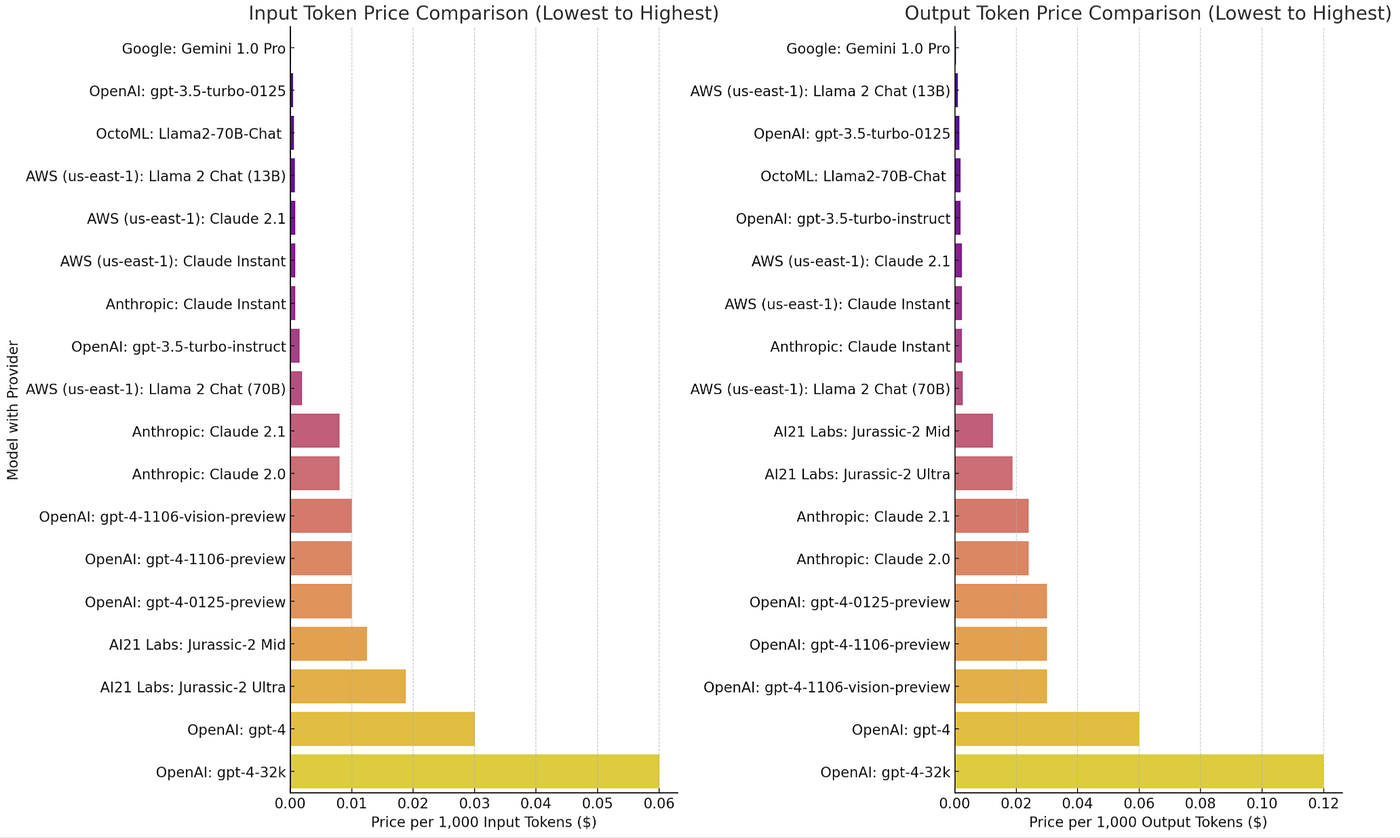
The challenge is that these costs scale with user behavior, making them hard to predict upfront. A chatbot used more actively than expected, unoptimized prompts, or workflows processing long documents can cause actual costs to be significantly higher than budgeted. This is why many businesses are surprised when they see their AI bills spike after a few months.
Cost 4: Personnel & Operational Costs
Personnel and operational costs cover the people and effort needed to keep the system running smoothly every day. This includes initial deployment time, system monitoring, incident handling, version updates, security assurance, and performance optimization.
Dify Cloud: Minimal human effort
With Dify Cloud, technical personnel requirements are quite low. Initial system setup typically takes only a few hours, including account registration, selecting a service plan, and starting chatbot development. Even non-technical business users or product managers can deploy basic chatbots themselves thanks to the no-code/low-code interface.
When chatbots become more complex, for example, with multi-step workflows or external system integrations, developer involvement may be needed. However, most effort focuses on logic and content design rather than infrastructure.
The key point is that system operations are almost entirely handled by Dify: version updates, security patches, scaling, backup, and monitoring. Businesses don’t need to maintain a team for these tasks.
In the first 12 months, personnel costs for Dify Cloud mainly lie in building and optimizing chatbots. Compared to self-managing infrastructure, this is a relatively light and controllable investment.
Self-hosted: Significant technical investment
With Self-hosted, it’s a different story. Businesses don’t just deploy the chatbot but also operate an entire system behind it.
The initial setup phase typically takes several weeks, including infrastructure preparation, system installation, security configuration, backup setup, and ensuring stable system operation. This work requires people experienced in cloud, networking, and system operations.
But the more resource-intensive part lies in long-term operations. The system needs performance monitoring, version updates, incident handling, backup verification, and security assurance. These tasks must be maintained consistently to avoid risks.
Real-world deployments show that self-hosted typically requires at least one DevOps engineer who can manage it part-time. For large systems or high stability requirements, operational resources increase further.
If converted to market personnel costs, this amount easily exceeds the savings from license fees. Even when using internal staff, there’s still opportunity cost- time spent on infrastructure operations could be used for projects that create more direct value.
Hidden Cost: Learning Curve and Mistakes
One factor rarely calculated is the learning curve. When first deploying self-hosted, suboptimal configuration, loose security setup, or incomplete backup procedures are quite common. These mistakes not only waste effort to fix but can also cause downtime or data risks. In many projects, the “invisible costs” from rework and operational incidents during the initial phase are not small.
Hidden Costs Often Overlooked
When comparing Dify Cloud cost and Dify Self-hosted cost, many businesses only look at easily visible expenses like licenses, servers, or APIs. However, in real AI projects, total cost of ownership (TCO) is also affected by factors that are hard to measure on invoices, but directly impact investment effectiveness.
Time to Value: Time for Chatbot to Deliver Value
With Dify Cloud, chatbots can typically go into production within a few weeks. Meanwhile, self-hosted usually requires more time for infrastructure setup, testing, security review, and internal approval steps. The timeline can therefore extend by several weeks to months.
This gap is sometimes more important than imagined. If a chatbot helps reduce workload or save operational costs each month, delayed deployment means the value delivered is also postponed. This is a type of “opportunity cost” that doesn’t appear on invoices but is very real in ROI calculations.
Risk and Downtime Cost
With the Dify Cloud model, most responsibility for ensuring uptime and handling incidents belongs to the service provider. Businesses using the service typically benefit from SLA and dedicated operations teams.
Conversely, with Dify Self-hosted, stability depends on the business’s internal technical capabilities. Infrastructure incidents, configuration errors, or database issues must all be handled internally. Each system interruption not only costs effort to resolve but can also affect user experience or internal processes.
Not all self-hosted systems are unstable, but achieving high stability requires proper operational procedures and personnel and that’s another cost to factor in.
Knowledge Transfer and Bus Factor
One rarely mentioned risk is dependency on individuals. If only one or two people understand the Dify Self-hosted system well, their transfer or departure can create a knowledge gap.
To reduce this risk, businesses typically need to invest in system documentation, process standardization, and cross-training within the team. These don’t create immediate value but are necessary for sustainable operations.
Cost Comparison Overview: Cloud vs Self-hosted
| Category | Dify Cloud | Dify Self-hosted | Notes |
| 1. Platform/License Fee | $59-159/month – Sandbox: Free (limited) – Professional: $59/month – Team: $159/month | $0 – Custom • Community: Free (open source) • Premium/Enterprise: Commercial license | Cloud has fixed fees, easy to budget. Self-hosted is free with Community, but enterprise needs will incur separate license fees. Self-hosted also generates operational costs. |
| 2. Infrastructure | $0 (Included in platform fee) | $50-350/month – Small: $30-50 – Medium: $70-150 – Large: $200-350 | Small/Medium/Large correspond to chatbot deployment scenarios from internal pilot, production for multiple users, to enterprise systems requiring high stability. |
| 3. AI Model API | $50-1,500+/month (Depends on usage & model choice) | $50-1,500+/month (Depends on usage & model choice) | Depends on traffic, model selection, and optimization level. |
| 4. Personnel & Operations | – Initial setup: 20-40 hours ($800-2,400) – Monthly operations: 5-10 hours/month ($200-600/month) | – Initial setup: 60-120 hours ($2,400-9,600) – Monthly operations: 20-40 hours/month ($800-3,200/month) | These numbers vary significantly by location. US/Western Europe is 2-3x higher than SEA/Eastern Europe. If using internal staff, factor in opportunity cost. |
| TOTAL COST FIRST 12 MONTHS | $5,000-15,000 (Typical SME scale) | $12,000-35,000 (Typical SME scale) | Self-hosted is typically 50-100% more expensive in the first year. Break-even point: 18-24 months if system is stable and maintenance effort decreases. |
The table above provides estimates for:
- Team size: 10-30 users
- Usage: Moderate (500-1,500 conversations/month)
- Location: Blended rate (mix of various markets)
- LLM: Mix of GPT-3.5 and GPT-4
- Timeframe: First 12 months
Dify Dify Self-hosted and Dify Cloud: Which Option Fits Your Business?
Whether it’s Dify Cloud or Dify Self-hosted, what matters most is choosing the option that fits your business context at this moment.
In reality, there’s no one-size-fits-all choice. The decision typically depends on three factors: organizational scale, internal technical capabilities, and strategic priorities at each stage.
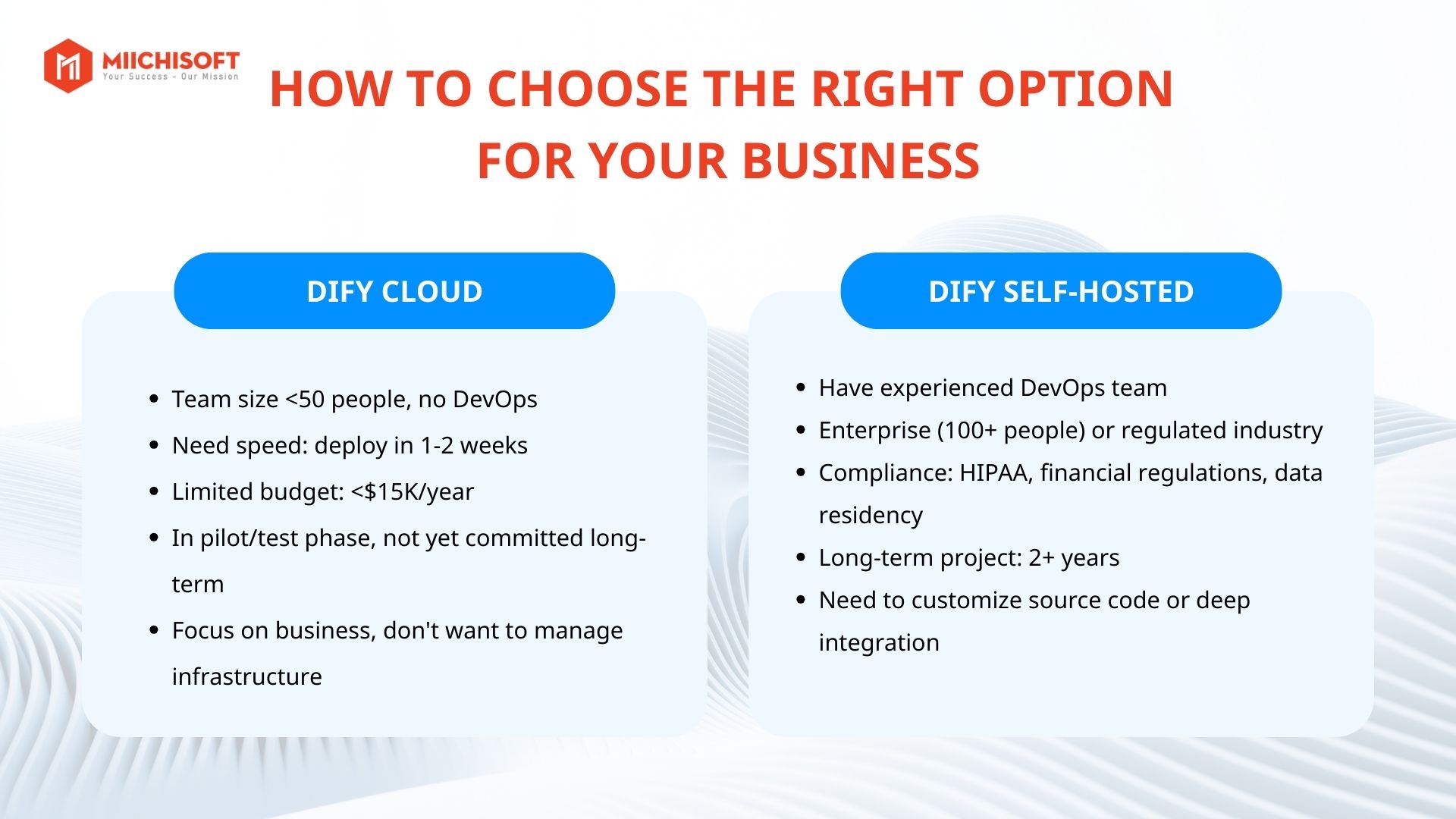
Organizational Scale
Business size directly affects the complexity of chatbot deployment and operations.
For small and medium-sized businesses, the most common needs are rapid deployment, controllable costs, and no infrastructure management. In this context, Dify Cloud is usually the right choice because it significantly reduces operational burden.
Conversely, in large organizations, chatbots can become part of the internal digital infrastructure. When user numbers increase, data grows, and governance requirements tighten, self-hosted or enterprise cloud options become worth considering.
Internal Technical Capabilities
Dify Self-hosted isn’t just about installing a system and letting it run. To operate stably in a production environment, businesses need to ensure factors like security, backup, monitoring, and incident handling.
Without a DevOps or IT operations team familiar with cloud infrastructure, self-hosted can easily become a long-term burden. Many systems work well for the first few months but start experiencing issues when usage increases. On the other hand, if your business already has a solid infrastructure operations team, deploying Dify isn’t a major obstacle.
The key point here isn’t whether you have developers, but whether you have the capability to operate production systems.
Strategic Priorities by Stage
The right choice today may not remain suitable in one or two years.
During the testing or evaluation phase, deployment speed and flexibility to change matter more than long-term cost optimization. Therefore, Dify Cloud is typically the reasonable choice.
Once the chatbot has proven its value and usage demand stabilizes, businesses can reassess to optimize costs or increase system control. In cases involving sensitive data or legal requirements, Dify Self-hosted or enterprise cloud is often prioritized to ensure compliance.
In practice, many businesses start with Dify Cloud to move quickly, then consider self-hosted when scale and operational requirements grow sufficiently large.
5 Best Practices When Deploying Dify
Whether you choose Cloud or Self-hosted, these 5 best practices are crucial for optimizing costs and ensuring success.
1. Start Small, Scale Gradually Based on Actual Needs
The most common mistake when deploying chatbots is designing the system for “future” scale from day one. Many businesses plan for thousands of users and invest heavily in infrastructure, but only use a fraction of capacity during the first 6-12 months.
A more effective approach is to start with just-enough configuration.
With Dify Cloud, this can be as simple as choosing the right plan for the testing phase instead of jumping to a high-tier plan immediately. With self-hosted, deploy on medium configuration before investing in large infrastructure. After some operational time, actual usage data will give you a much clearer picture than any initial predictions. Then, scaling up will be more accurate and cost-effective.
2. Track LLM Costs from Day One
AI model costs are typically the most variable expense in the entire chatbot system. Without early tracking, businesses easily fall into “unexpected bill spike” situations.
In the early stage, daily usage monitoring helps you understand:
- What users ask most frequently
- Which questions consume the most tokens
- Which prompts or workflows aren’t optimized
Then maintain weekly or monthly reviews to detect abnormal trends.
3. Document the System Early (Especially for Self-hosted)
Good documentation reduces dependency on individuals and makes handoffs, expansion, or incident handling much faster.
Content that should be documented includes:
- Overall system architecture
- Installation and configuration procedures
- Backup and recovery guidelines
- Common error troubleshooting
- System update procedures
Investing time in initial documentation may be labor-intensive, but it saves significant resources long-term.
4. Think About Migration Capability from the Start
Many businesses start with Cloud to move quickly, then consider self-hosted when scale grows. Others go the opposite direction. Reality proves migration is always more complex than expected without early preparation.
Some principles to reduce risk:
- Minimize dependency on platform-specific features
- Export data regularly and test re-import capability
- Clearly document integrations with external systems
- Keep architecture simple and easy to restructure
5. Invest in Prompts and Content, Not Just Infrastructure
Many businesses spend excessive time discussing servers, configurations, or architecture, but underestimate the quality of prompts and knowledge base.
In practice, chatbot value largely lies in answer quality. Good infrastructure cannot compensate for poor content. Conversely, good prompts and clean data can create effective chatbots even on simple configurations.
Reviewing and improving content based on logs and user feedback is the fastest way to enhance chatbot quality.
Dify Implementation Support Services from Miichisoft
Miichisoft provides consulting and Dify implementation support services for businesses, supporting both Dify Cloud and Self-hosted models. We don’t just assist clients with technical implementation, we start from problem analysis, identifying suitable use cases, designing system architecture, through to operations and optimization after go-live.
Learn more: Miichisoft Launches 50% Off Dify AI Chatbot Implementation Support Package – Limited to 10 Slots Only
What sets Miichisoft apart is our long-term approach. Instead of just deploying the system and leaving, we partner as a Growth Partner, working with businesses to clarify business objectives, build deployment roadmaps that fit budget and internal resources, while optimizing chatbots according to actual usage stages.
This approach ensures chatbots don’t just “work,” but truly create measurable value from saving operational costs and enhancing customer experience to supporting revenue growth.
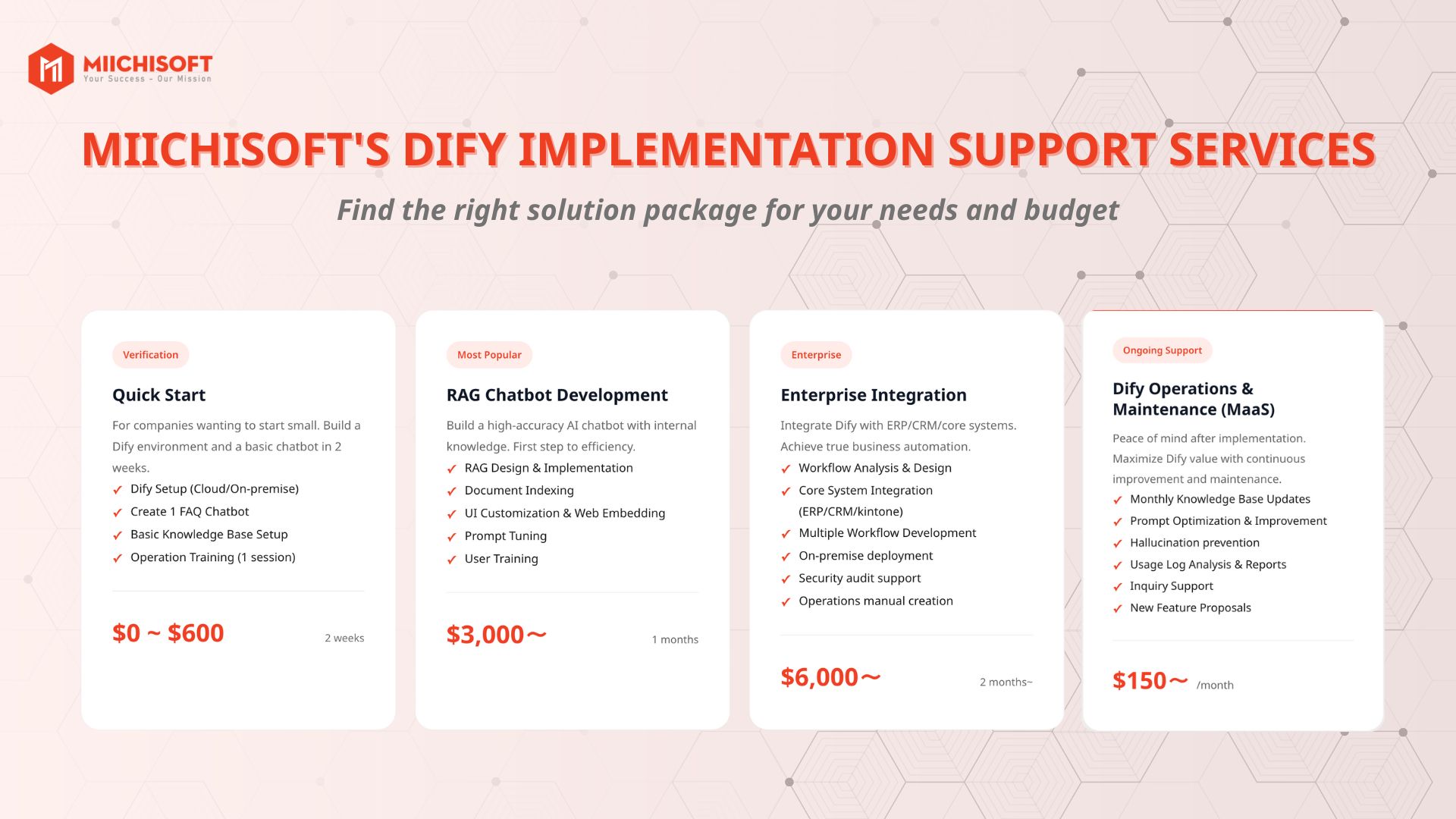
We know the biggest barrier isn’t technology, but uncertainty: Is Dify really suitable? Are the costs worthwhile? Can our team actually implement it?
Understanding this need, from February 2-15, Miichisoft is offering 50% off the Quick Start package. Instead of requiring businesses to invest heavily upfront, Miichisoft provides a path to start small, test practically with low costs, evaluate concretely, then decide to scale.
After 2 weeks, you’ll have:
- A pilot chatbot running with your business’s actual use case
- Clear understanding of real TCO (no more vague estimates)
- Internal team knowing how to operate and maintain
- Concrete roadmap for the next phase
- Decision on whether to continue based on real data
If your business wants to try applying Dify to operations but doesn’t know where to start, contact Miichisoft now for free consultation.
Conclusion
For Dify Cloud vs Self-hosted, there’s no “absolutely best” choice, only the right choice for each business.
If you prioritize rapid deployment, minimal operational burden, and cost optimization in the early stage, Dify Cloud is typically the reasonable option. If your business has high data control requirements, deep customization needs, and already has a strong technical team, Dify Self-hosted may be the long-term choice.
What matters isn’t choosing based on intuition, but calculating TCO correctly, seeing internal capabilities clearly, and understanding AI usage goals for the next 1-2 years.
If you’re considering deploying Dify for your business and want practical insights tailored to your specific situation, the Miichisoft team can provide consulting and propose suitable roadmaps, from PoC to actual deployment.
Contact Miichisoft now for free consultation.
Frequently Asked Questions (FAQ)
Q1: Does Dify Cloud have customization limitations?
Dify Cloud still allows strong customization for workflows, prompts, UI embedding, and knowledge base structure.
However, you cannot intervene in the source code or install custom modules. If your business needs deep system-level customization (custom auth, RAG engine modification, complex internal integrations), self-hosted would be more suitable.
In reality, about 90% of business needs can be met well with Dify Cloud.
Q2: How long before self-hosted becomes cheaper than Cloud?
If comparing infrastructure fees alone, self-hosted may seem cheaper. But when calculating fully:
- Initial setup costs
- Operation & maintenance time
- Opportunity cost of technical team
Self-hosted typically costs more during the first 12-18 months.
Self-hosted only becomes truly cost-effective when the system is stable, operational effort decreases, and the project has long-term plans.
Q3: Is Dify Cloud secure enough for sensitive data?
Dify Cloud has data encryption and security standards suitable for most SMEs and many large enterprises.
However, for industries with high compliance requirements (finance, healthcare, sensitive internal data), businesses should consider self-hosted or private cloud.
Most importantly, evaluate based on your business’s actual compliance requirements, don’t assess generically.
Q4: Does Miichisoft support both Cloud and Self-hosted deployment?
Yes. Miichisoft supports both models:
- Dify Cloud: chatbot development, RAG, prompt optimization, system integration
- Self-hosted: infrastructure setup, security, monitoring, DevOps support
Miichisoft serves as a neutral consultant, helping businesses choose the right option based on budget, objectives, and internal capabilities.
![[Dify Case Study] Dify AI Contract Review Chatbot in 2 Minutes – Standardized to Internal Compliance Requirements](https://miichisoft.com/wp-content/uploads/2026/02/difyai-2-1.jpg)
![6 Criteria for Dify Implementation Vendor Selection you must know! [Free RFP Template]](https://miichisoft.com/wp-content/uploads/2026/02/dify-vendor-jp-1.jpg)