




Internal chatbot is transforming how enterprises operate and manage internal processes. With low implementation costs, 24/7 availability, and the ability to scale easily across organizations, this type of AI solution has moved from experimentation to real-world adoption.
According to recent AI chatbot adoption statistics, approximately 58% of B2B enterprises and over 60% of companies with more than 5,000 employees have already integrated chatbots into their operations. These systems are increasingly used in HR and operations teams to support information lookup, employee onboarding, and the handling of repetitive internal inquiries.
In this article, we will walk you through how to build an internal chatbot using Dify – a no-code platform that enables businesses to quickly create AI-powered assistants connected to internal knowledge bases.
Why Do Enterprises Need an Internal Chatbot?
Time Wasted and Reduced Productivity
In many organizations, employees spend a significant amount of time searching for internal information needed for daily tasks. According to a McKinsey report, employees spend an average of 1.8 hours per day – equivalent to 9.3 hours per week – simply looking for information across internal systems and documents.
In addition, multiple HR and IT surveys and real-world case studies show that an estimated 60-75% of inquiries sent to these teams are repetitive questions. The information already exists in internal documentation, policies, or knowledge bases, but employees often struggle to find the right answers quickly on their own.
High Onboarding and Training Costs
Onboarding and training costs continue to rise, largely due to wasted time and resources in supporting new employees. Multiple studies on corporate training show that learners can forget up to 50% of information within one hour and as much as 90% after one week if the content is not reinforced.
This phenomenon aligns with the forgetting curve identified by Hermann Ebbinghaus in the 19th century, which demonstrates how human memory declines rapidly without repetition or reinforcement mechanisms.
As a result, HR, L&D, and internal training teams are often required to repeatedly address the same basic questions. This repetition reduces the overall effectiveness and scalability of corporate training programs.
Fragmented Internal Knowledge
In many enterprises, internal knowledge is scattered across multiple platforms such as email, Google Drive, Slack, Notion, and various internal systems. As a result, employees often struggle to locate the information they need for daily work. Furthermore, when information is shared across multiple people and communication channels, organizations face a higher risk of inconsistent information, which can lead to confusion in the execution of internal processes and policies.
In addition, critical domain expertise is frequently concentrated in a small number of individuals. This creates a significant risk of knowledge loss when these employees leave the organization or move into different roles.
Building an Internal Chatbot with Dify: A Practical Solution to Enterprise Challenges
An internal chatbot is a virtual assistant deployed within an organization, enabling employees to directly ask and receive answers to internal questions related to processes, policies, documentation, and work guidelines based on the company’s official data sources.
When designed and implemented properly, an internal chatbot can:
- Provide instant, 24/7 answers to questions about processes, policies, and internal documentation
- Centralize internal knowledge into a single point of access
- Reduce the workload for HR, IT, and administrative teams, allowing them to focus on higher-value tasks
- Ensure consistent and up-to-date information aligned with official company data
- Accelerate onboarding by enabling new employees to learn independently and adapt more quickly
Building an internal chatbot with Dify – an open-source platform for creating intelligent AI chatbots without requiring programming skills -is an effective option for many enterprises. Dify allows organizations to integrate leading AI models such as GPT-4, Claude, and Gemini with their internal knowledge bases, creating a virtual assistant that truly understands the business context.
Learn more: What is Dify? Core functions and advantages
Real-World Internal Chatbot Demo Built with Dify by Miichisoft
What Should You Prepare Before Getting Started?
Before starting to build an internal chatbot with Dify, careful preparation of documentation and data is the most critical step in determining the quality of the final solution. A chatbot can only be effective when it has access to high-quality, well-structured information to learn from and retrieve answers.
Supported File Formats
Dify supports a wide range of commonly used document formats. For text-based content, you can use PDF, DOCX, TXT, or Markdown files. Data files such as CSV, Excel, JSON, PPTX, and RTF, as well as web formats like HTML and XML, are also fully supported.
Content to Prepare
Before starting to build an internal chatbot with Dify, organizations should consolidate the necessary materials to serve as the chatbot’s knowledge base.
- Processes and SOPs (Standard Operating Procedures): These include detailed workflows for each department, instructions for using internal systems, and daily task checklists.
- Policies and Regulations: From leave policies and attendance rules to remote work policies, employee benefits, codes of conduct, and company culture guidelines.
- Training Materials: Company and product introductions, role-specific domain knowledge, and onboarding materials should be prepared carefully and kept up to date.
- FAQs (Frequently Asked Questions): A consolidated list of frequently asked employee questions will help the chatbot respond more quickly and accurately.
- Product and Service Documentation: This includes detailed product information, pricing and policy documents, as well as case studies and success stories, which are particularly valuable for sales and customer support teams.
Optimization Tips
Instead of using a single large document of hundreds of pages, divide the content into smaller files organized by clear topics such as Human Resources, Products, IT Support, or Sales Processes. This approach not only makes the knowledge base easier to manage but also simplifies future updates and maintenance.
In addition, before uploading data to Dify, make sure to:
- Remove sensitive information, passwords, and personal data
- Eliminate unnecessary email addresses and phone numbers
- Update outdated or inaccurate information
- Standardize formatting and writing style across documents
Step-by-Step Guide to Building an Internal Chatbot with Dify
Step 1: Account Registration and Initial Setup
Register a Dify Account
You have two options, depending on your organization’s requirements:
- Dify Cloud: The recommended option for beginners due to its simplicity and speed of setup. All infrastructure management and maintenance are handled by Dify, allowing you to focus entirely on building content and configuring your internal chatbot.
- Self-hosted: Suitable for enterprises that require full data control or have strict security and compliance requirements. With a self-hosted deployment, Dify is installed on your company’s own servers, ensuring that data remains entirely within internal systems.
Learn more: Dify Cloud vs. Self-hosted – Which option is right for your enterprise?
Configure API Keys for LLMs
The next step in building an internal chatbot with Dify is configuring API keys to connect AI models. Dify is compatible with most leading AI providers, including OpenAI, Anthropic, Azure OpenAI, and Google, among others.
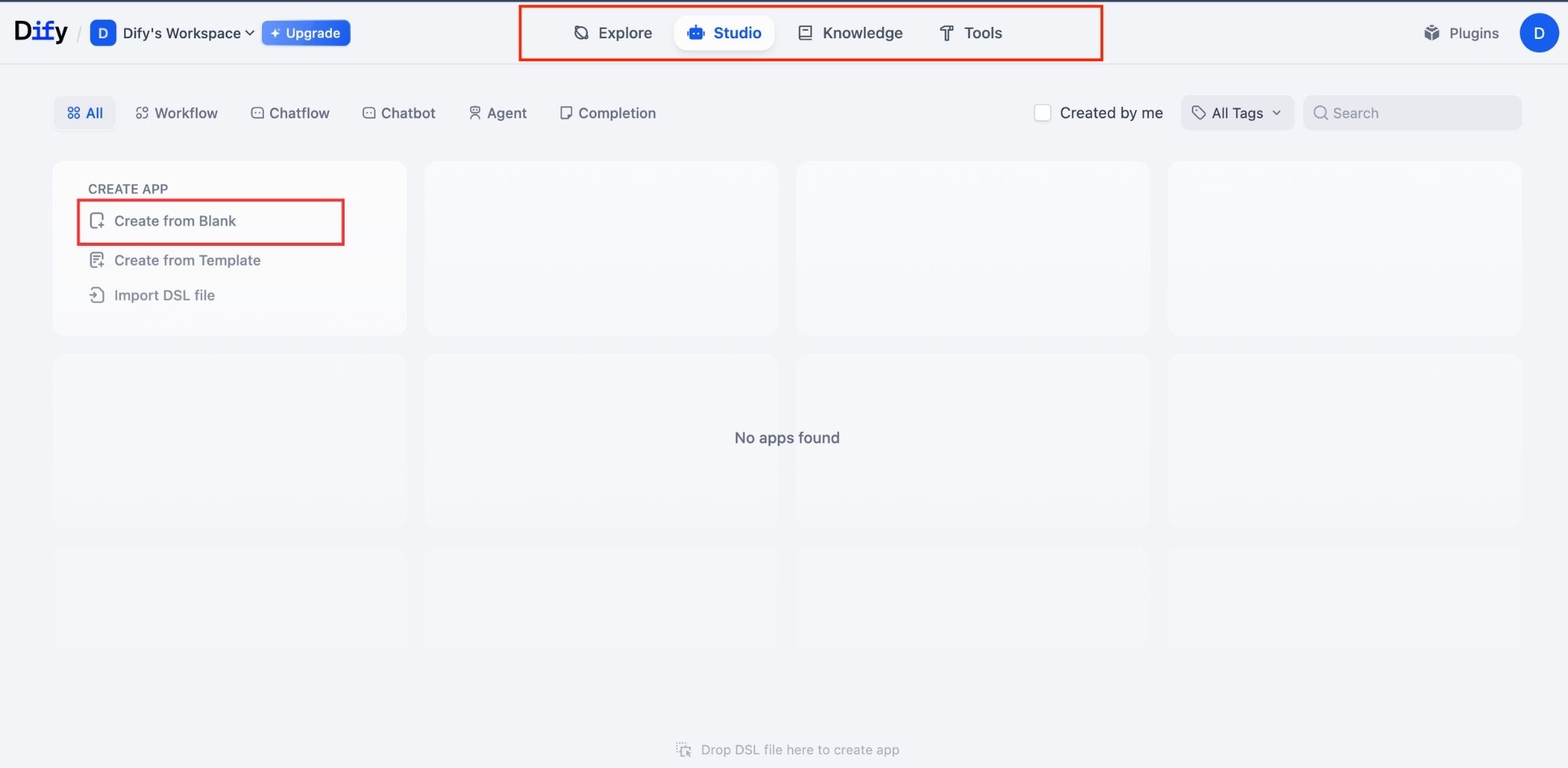
Dify’s Dashboard
The Dify interface is designed to be intuitive and user-friendly. The main sections include:
- Explore: Browse and use public applications or bots from the community or your workspace for reference and testing.
- Studio: Create and manage all of your applications.
- Knowledge: Manage the entire knowledge base, including creating new datasets, uploading documents, configuring chunking and indexing, and monitoring processing status.
- Tools: Manage tools and extensions such as API tools, moderation features, and code-based extensions.
Step 2: Create a Knowledge Base
Access and Create Knowledge
When building an internal chatbot with Dify, you first need to create a knowledge base for the chatbot to reference. From the dashboard, select Knowledge in the left-hand menu, then click Create Knowledge.
Assign a clear and descriptive name to the knowledge base, for example: “Miichisoft_Rewards and Penalties Policy 2026”, to make future management and search easier.
Upload Documents
Click Add File or drag and drop files directly into the upload area. Dify supports bulk uploads, allowing you to select and upload multiple files at the same time.
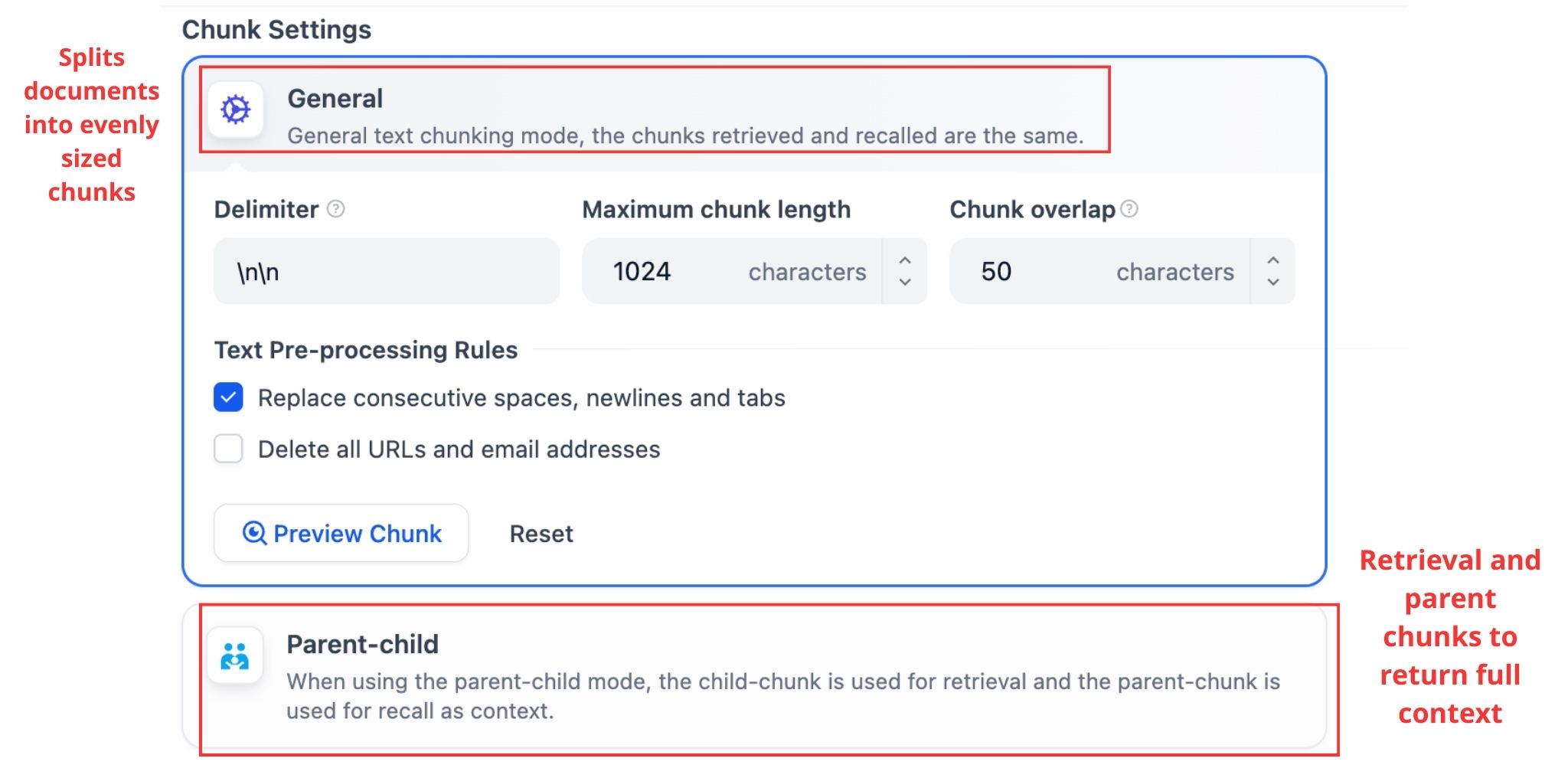
Configure Chunk Settings
In the Chunk Settings section, choose either General or Parent-child mode:
- General: Splits documents into evenly sized chunks. This simple approach is suitable for getting started.
- Parent-child: Uses child chunks for retrieval and parent chunks to return full context, making it more suitable for long and complex documents.
You can use the Preview Chunk feature to review how the content is segmented and adjust the settings before processing.
Select an Index Method
In the Index Method section, choose one of the following options:
- High Quality: Uses an embedding model to convert content into vectors, enabling semantic search. This option is recommended for internal chatbots that require high accuracy.
- Economical: Uses up to 10 keywords per chunk. This option does not consume tokens but relies on keyword-based search, resulting in lower accuracy.
Configure Retrieval Settings
If you select Economical, the Retrieval Settings section allows you to use an Inverted Index with the Top K parameter.
- An inverted index is a data structure used to quickly locate chunks that contain specific keywords, similar to how traditional search engines work.
- Top K determines the number of most relevant chunks returned for each query (default is 3). This value can be increased to 5–8 if the documentation is highly fragmented.
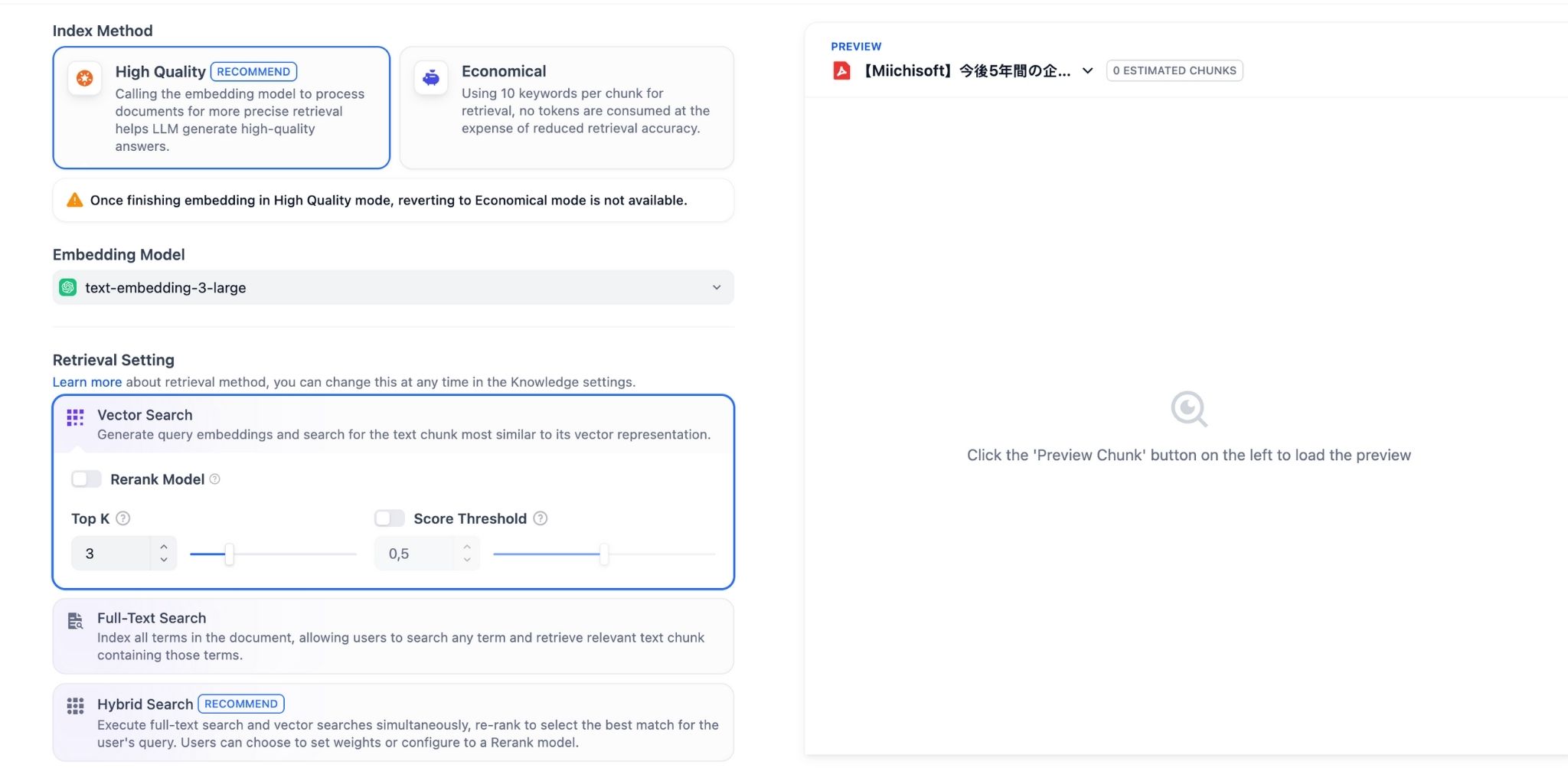
After completing the configuration, click Save & Process to allow Dify to start processing the documents.
Step 3: Create a New Internal Chatbot
Choose the Application Type
Go to Studio and select Create new app. You will see four main options:
- Chatflow: A multi-step conversational workflow that allows you to design more complex processing flows.
- Chatbot: A single-purpose chatbot, suitable for standard question-and-answer use cases.
- Agent: Designed for chatbots that can use tools and perform actions.
- Text Generator: Focused on text generation tasks such as writing, summarization, classification, translation, and content normalization.
For building an internal chatbot with Dify, Chatbot is a suitable choice. If your processing logic is more complex, you may consider Chatflow or Agent.
Name and Describe the Chatbot
Choose a meaningful and easy-to-remember name such as “HR Assistant”, “IT Support Bot”, or “Internal Assistant”.
The description should briefly state the purpose, for example: “A chatbot that provides information on internal HR policies and reward and penalty regulations”, which helps with management when multiple applications are in use.

Step 4: Configure Prompts and Instructions for the Internal Chatbot
Enter Instructions for the Internal Chatbot
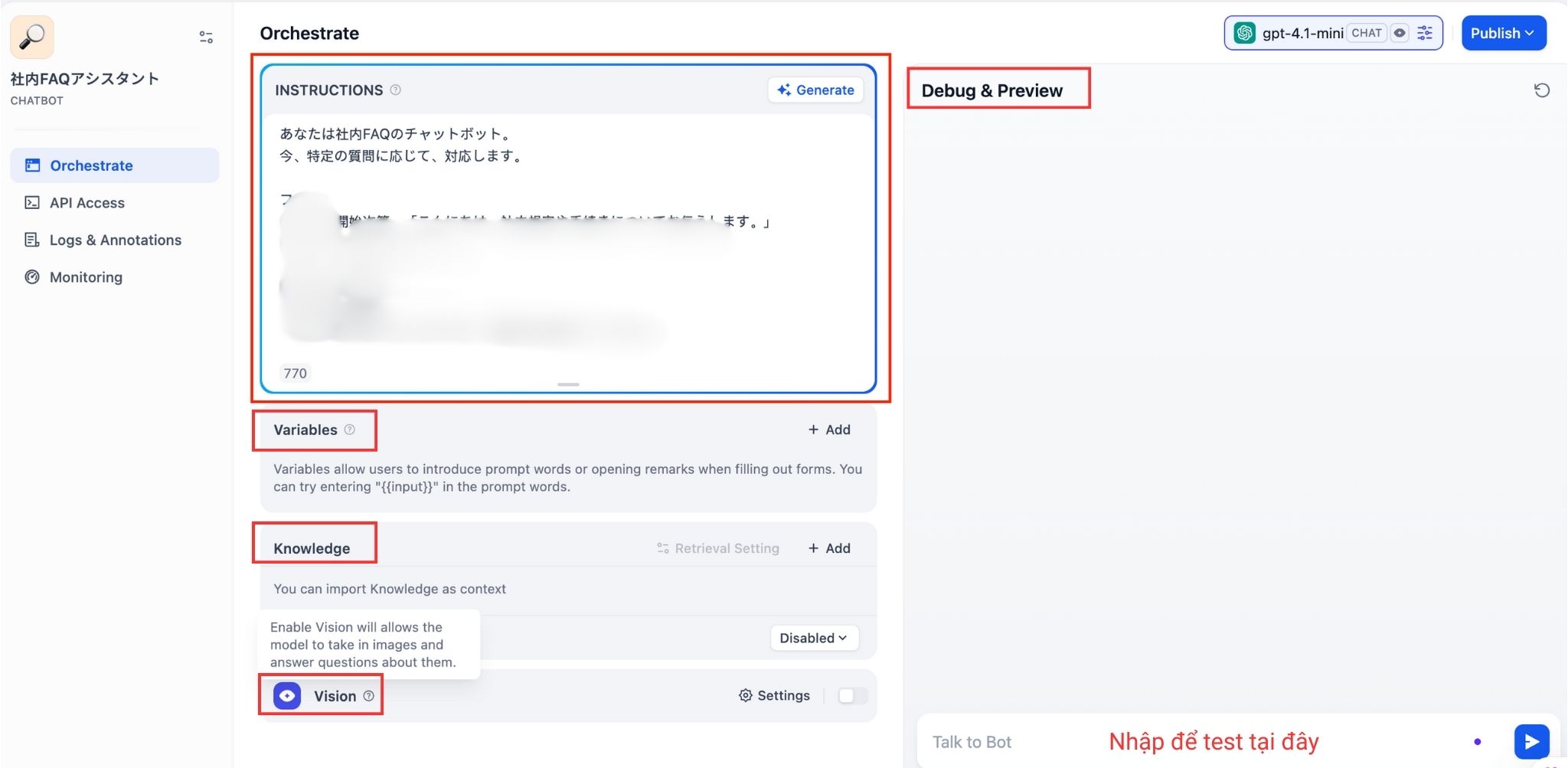
In the Orchestrate screen of the Chatbot, enter the bot instructions (system prompt) in the INSTRUCTIONS field. Within the instructions, you can add one or two sentences defining the communication style, for example:
“Maintain a friendly and objective tone, and focus on providing practical, solution-oriented guidance for employees.”
Example Instructions
You are the internal virtual assistant of Company ABC, responsible for supporting employees with:
- HR policies and internal regulations
- Work processes and SOPs
- Questions related to products and services
- Basic IT and technical support
Operating principles:
- Always respond in Vietnamese, in a clear and friendly manner
- Provide answers only based on the information available in the provided documents
- If the information cannot be found, state clearly:
“I cannot find this information in the available documents. Please contact [relevant department] for further support.” - Cite document sources whenever possible
- If a question is unclear, ask follow-up questions to better understand the request
Download now: A ready-to-use prompt prompt template to analyze customers and prepare a winning first-meeting agenda
In addition, the screen includes several key sections:
- Variables: Allows you to define variables that can be reused within the Instructions or messages.
- Knowledge: Where you enable internal data sources for the chatbot.
- Vision: Enables or disables image-reading capabilities (if supported by the model), used for use cases where users upload images for the bot to analyze.
Step 5: Connect the Knowledge Base to the Internal Chatbot
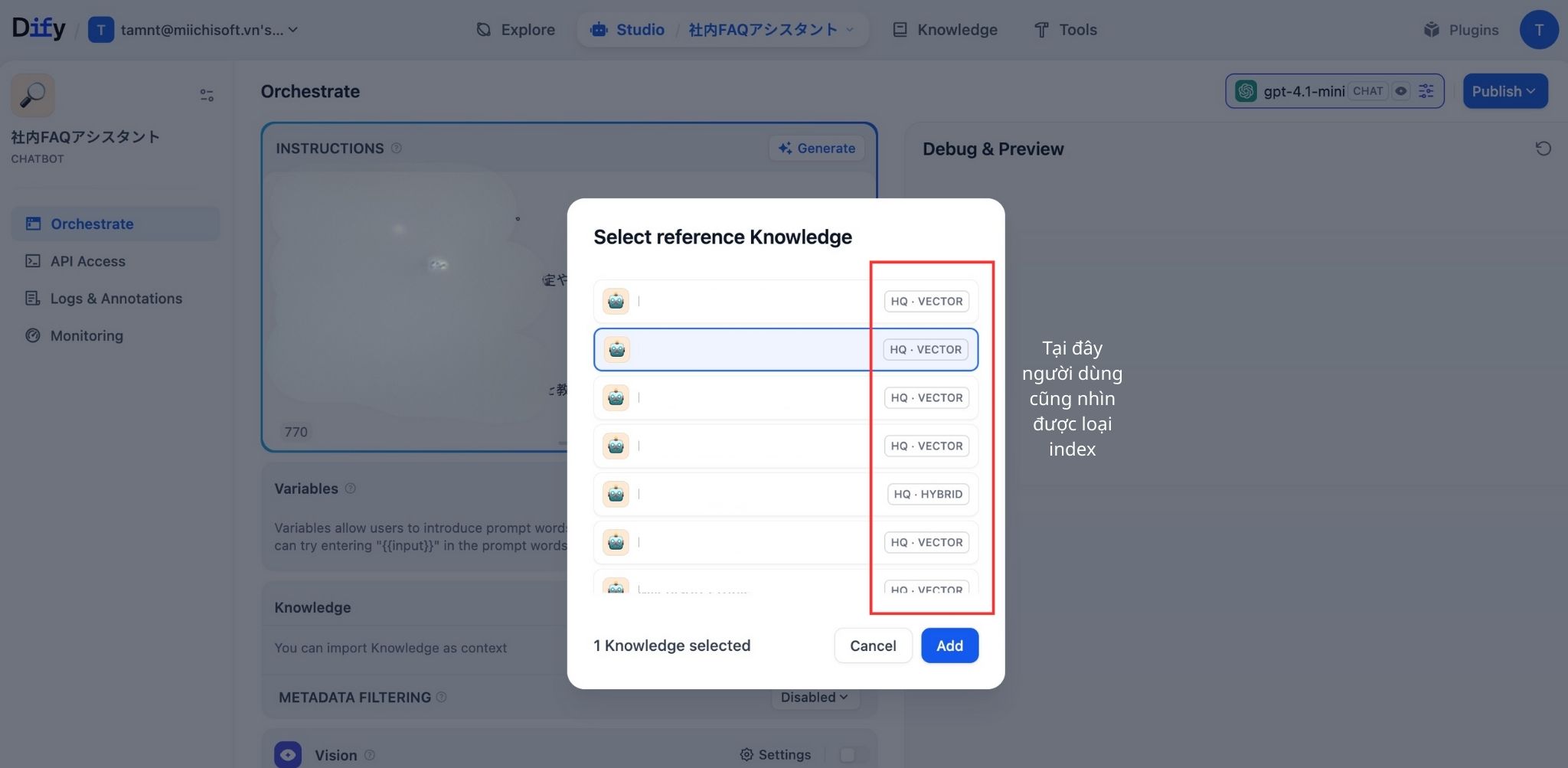
In the Orchestrate tab of the chatbot, scroll down to the Knowledge section and click Add. When the Select reference Knowledge window appears, select the knowledge base created in Step 2, then click Add. At this stage, users can also see the index type (e.g. HQ · VECTOR / HQ · HYBRID / Economical).
After this step, each question sent to the internal chatbot will be able to retrieve content from the selected knowledge bases.
Use the Debug & Previewpanel on the right to enter sample questions and verify whether the chatbot responds correctly based on the documents. If:
- The bot cannot find information even though it exists in the documents, try increasing the Top K value or reviewing the chunking and indexing settings of the knowledge base.
- The bot provides irrelevant answers, try reducing the Top K value or narrowing the set of knowledge bases connected to the chatbot.
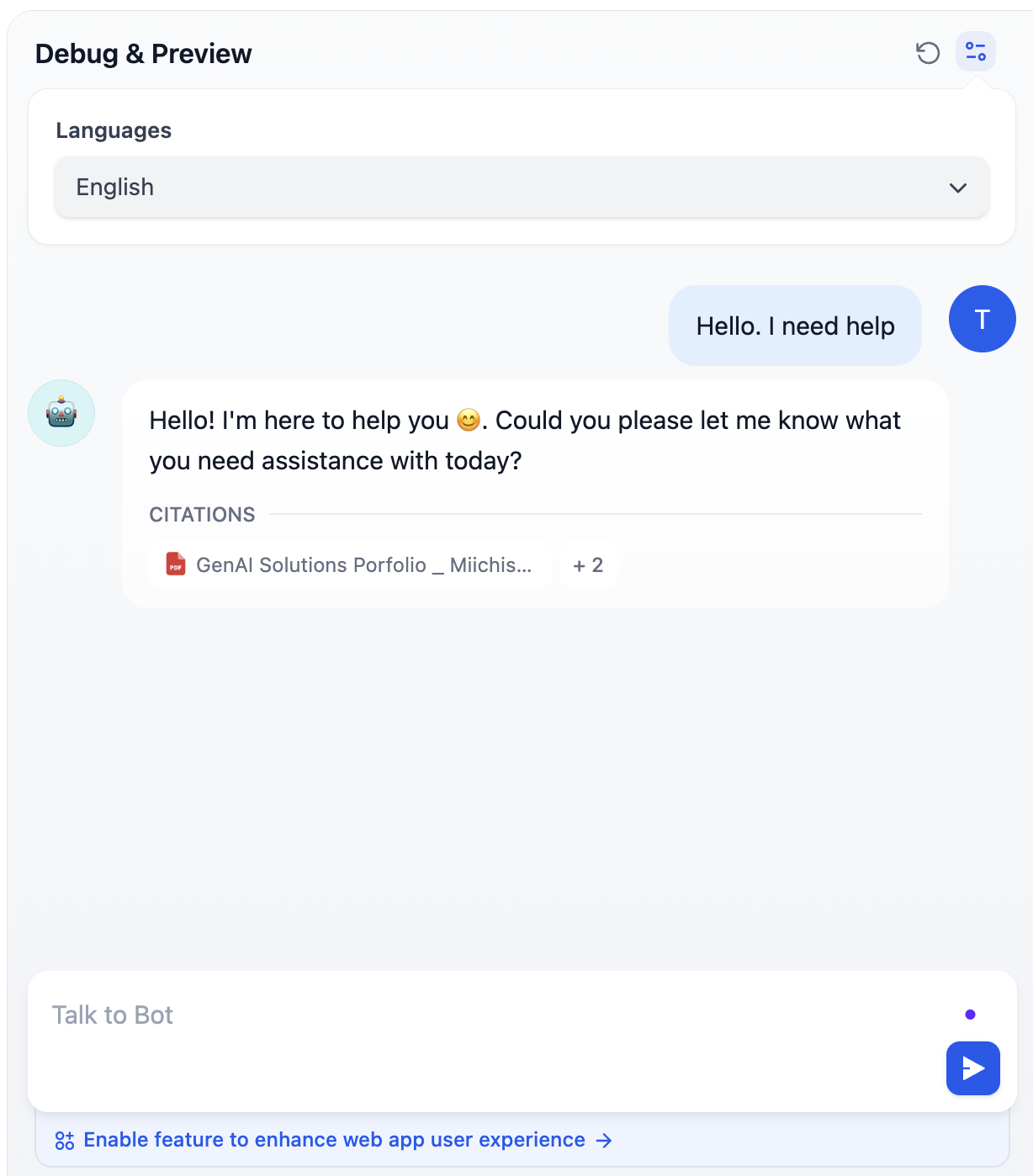
Step 6: Test and Deploy the Internal Chatbot
Test with a Prepared Set of Around 30 Questions
Go to the Preview tab and start asking each question from the list of approximately 30 prepared test questions.
Test with Abbreviated and Informal Questions
In real-world usage, employees do not ask questions in a textbook-style format. Test common abbreviations and informal phrasing to verify whether the bot can understand and respond correctly. If not, adjust the prompt or reduce the score threshold.
Test with Multiple Users
Invite 5–7 users from different departments to test the chatbot over 2–3 days. Collect feedback on the following points:
- Does the bot answer their questions correctly?
- Are the responses easy to understand?
- Are there questions the bot cannot answer?
- What improvements do users expect from the bot?
Debug and Fine-Tune
Based on the test results, adjust as follows:
- If the bot frequently responds with “I don’t know”: Reduce the threshold to 0.65 and increase Top K to 6
- If the bot provides incorrect answers: Review the source documents and update or clarify the content
- If the bot’s responses are too verbose: Reduce max tokens and add a “be concise” instruction to the prompt
- If the bot does not understand Vietnamese without diacritics: Add relevant examples to the prompt
Publish and Deploy Internally
Once you are satisfied with the chatbot’s quality, click Publish and choose the appropriate deployment method. At this point, you have successfully completed building an internal chatbot with Dify.
Advanced Features When Building Internal Chatbot With Dify
Workflow and Tool Integration
An internal chatbot can perform real actions by integrating workflows and tools. For example, the chatbot can automatically create a ticket in Jira when it receives a bug report from an employee, send notification emails via the Gmail API, retrieve data from Google Sheets, or call internal APIs to check order status.
To configure this, switch to Agent mode or Workflow, then add tools from the Dify marketplace or create custom tools. Finally, clearly define in the prompt when and how the chatbot should use each tool.
Using Multiple Knowledge Bases
In many cases, you need to combine knowledge from multiple sources. For example, Knowledge Base 1 may contain HR documents, Knowledge Base 2 technical documentation, and Knowledge Base 3 product information. The chatbot can intelligently search across all these sources and return the most relevant information from the most appropriate knowledge base.
Configuring Multi-turn Conversations
Multi-turn conversations allow the chatbot to retain conversational context, creating a more natural user experience. For example, when a user asks, “What is the leave request process?”, the bot provides a detailed answer. If the user then asks, “How many days in advance do I need to submit the request?”, the bot understands that “the request” refers to a leave request and responds accordingly, without requiring the user to restate the context.
Citations and Source Tracking
Displaying information sources significantly increases trust and reliability. Instead of providing an answer alone, the chatbot can respond with statements such as: “According to company policy (Page 5, Employee Handbook 2024), employees are entitled to 12 days of annual leave,” along with a link to the source document.
To enable this feature, go to Settings and turn on Show Citations, and include instructions in the prompt requiring the bot to cite sources whenever possible.
Case Studies: Companies Successfully Implementing Internal Chatbots with Dify
Enterprise Knowledge Assistant for a SaaS Company
A SaaS provider used Dify to build an Enterprise Knowledge Assistant to address the challenge of internal documentation scattered across multiple platforms such as Confluence, SharePoint, and standalone PDF files. All documents were consolidated into an internal Q&A chatbot, allowing employees to search for information using natural language.
After deployment, internal information search time decreased by 65%, first response time for FAQ inquiries dropped by 72%, and 38% of tickets were fully self-served via the chatbot. Notably, 85% of employees used the chatbot on a weekly basis, indicating a high level of adoption across the organization.
IT Helpdesk and Internal Technical Support Chatbot
ID Europe built an internal chatbot using Dify to automate IT Helpdesk operations. The chatbot handled tasks such as answering common issues, guiding account resets, locating technical manuals, classifying tickets, and providing multilingual support.
In a project for a Japanese manufacturer, the total number of IT inquiries decreased from 650 to 370 (–57%). In another enterprise, the chatbot automatically processed approximately 300 requests per day, reducing manual workload for the IT team by up to 90%.
Enterprise Knowledge Base for Sales and Bid Teams
White Gui implemented an enterprise-level knowledge base combined with RAG on Dify to support Sales and Bid teams during proposal preparation. The system consolidated company profiles, technical documentation, and financial information into an internal Q&A chatbot.
After deployment, the chatbot achieved over 80% answer accuracy, improved proposal processing efficiency by approximately 80%, and significantly reduced reliance on long-tenured experts when responding to customer inquiries.
Common Issues and How to Fix Them When Building Internal Chatbots with Dify
Bot gives incorrect or hallucinated answers
This is the most common issue. It usually happens when the documents are incomplete, the score threshold is set too low so irrelevant content is retrieved, or the prompt does not clearly restrict the bot to using internal documents only.
First, check whether the required information actually exists in the documents. If it does, increase the score threshold to 0.75 or higher so the bot only retrieves highly relevant content. Most importantly, add a clear instruction in the prompt: the bot must answer strictly based on the provided documents, must not guess or fabricate information, and must clearly say it does not know when information is missing.
Bot says “I don’t know” even though the information exists
This usually happens when the score threshold is too high, the wording of the question is different from how the information is written in the documents, or the chunk size is too small and breaks the context.
Lower the score threshold to around 0.6–0.7, test multiple variations of the same question, increase the chunk size to about 800–1000 words to preserve context, and check that the documents have been indexed correctly.
Documents cannot be uploaded
This issue may be caused by large file sizes, unsupported file formats, or corrupted or improperly encoded files.
Compress large PDF files, convert documents to supported formats if needed, verify that files can be opened normally, and try uploading files one by one to identify problematic files.
Need to change the bot’s response style
The response style of an internal chatbot built with Dify is mainly controlled through the prompt.
Add clear instructions in the prompt to define the desired tone, such as friendly, professional, or concise. Providing short examples in the prompt helps the bot follow the style more consistently.
Bot responds in mixed languages
This usually happens when language requirements are not explicitly stated in the prompt.
Add a mandatory instruction at the beginning of the prompt requiring the bot to always respond in Vietnamese with proper accents, even if the question is asked in another language.
Chatbot responds slowly
Slow response times are often caused by using large models, high Top-K values, large token limits, or reranking settings.
Switch to a smaller model, reduce Top-K to 2–3, lower the max token limit, disable reranking if enabled, and check the performance of the AI API provider.
Miichisoft – Your Dify Implementation Partner for Enterprises
When Does a Business Need an Implementation Partner?
Although Dify is a no-code platform, self-implementation is usually only suitable for simple use cases. In practice, many enterprises choose to work with an implementation partner when technical complexity, speed, and long-term efficiency become critical, especially in the following situations:
- The company lacks an experienced internal IT/AI team, or the existing team is already overloaded with operational tasks
- The solution requires deep integration and complex customization with existing systems
- Performance, cost optimization, and scalability are critical when deploying at enterprise scale
- The company aims to adopt AI in a structured, long-term way rather than stopping at a single standalone chatbot
Miichisoft’s Services
Miichisoft provides end-to-end Dify chatbot implementation services, covering the entire project lifecycle from consulting and solution design to deployment and operation. To minimize investment risks, Miichisoft offers AI Proof of Concept (PoC) projects delivered within 2–4 weeks, allowing enterprises to validate a specific use case, measure real business impact, and estimate ROI before scaling further.
Miichisoft also supports seamless integration of Dify with existing systems such as ERP, CRM, Slack, and Microsoft Teams, ensuring that chatbots can securely access and update internal data.
For organizations with strict security requirements, Miichisoft deploys self-hosted Dify on AWS, Azure, GCP, or on-premise environments, along with security hardening, monitoring, and CI/CD setup. After go-live, ongoing Support & Maintenance services ensure stable operations and continuous optimization.
Conclusion
An effective AI chatbot not only helps employees work faster, but also frees up support teams to focus on higher-value tasks. For many organizations, this is a practical and low-risk first step in their digital transformation and enterprise AI adoption journey.
If your requirements are simple and you want to explore the technology firsthand, you can start by building an internal chatbot with Dify Cloud. However, as use cases become more complex, internal AI chatbot implementations should be designed with the right roadmap and architecture from the beginning to avoid unnecessary costs and risks later on.
In such cases, Miichisoft can be your trusted partner. With over 7 years of experience working with Japanese enterprises, we not only deliver AI and internal chatbot solutions but also deeply understand Japanese business culture, processes, and strict quality standards. Miichisoft supports enterprises end to end, from strategic consulting and solution design to implementation and continuous optimization, ensuring that AI chatbots deliver sustainable business value rather than remaining a short-term experiment.
Contact Miichisoft to receive in-depth consultation on Dify chatbot solutions, including architecture design, system integration, deployment, and long-term operation.
FAQ
- I don’t know how to code. Can I still build a chatbot?
Absolutely yes. Dify is designed specifically for non-technical users. Its intuitive drag-and-drop interface allows you to upload documents, write instructions in natural language, test, and publish—all through a web interface. No coding is required.
- How long does it take to build a chatbot?
For a basic chatbot, it typically takes 2–4 hours if your documents are ready. This usually includes account setup and API configuration, uploading and processing documents, creating the app and prompt, and basic testing. More advanced chatbots with integrations or complex logic may take 1–2 working days.
- Do we need a developer tomaintain the internal chatbot?
Not necessarily. Routine tasks such as updating documents, editing prompts, reviewing usage analytics, and exporting conversation logs do not require technical skills.
A developer is only needed for advanced scenarios such as API or database integrations, custom UI/UX, self-hosted deployment, or deep technical troubleshooting.
- Is company datasecure?
This depends on the deployment model. With Dify Cloud, data is encrypted and stored on Dify’s servers, compliant with GDPR and international security standards. AI providers (e.g. OpenAI, Anthropic) process the data for inference.5With self-hosted (on-premise) deployment, all data remains on your own servers, giving you full control over security. This option is suitable for highly sensitive data in industries such as finance, healthcare, or government.
- What is the monthly cost for theDify internal chatbot?
Costs consist of three main components:
- Dify platform: Cloud Free (200 credits/month for testing), Cloud Professional ($59/month), or self-hosted (software is free, hosting costs apply).
- AI API usage: GPT-3.5 Turbo (~$0.002/1,000 tokens), GPT-4 Turbo (~$0.01/1,000 tokens), Claude 3.5 Sonnet (~$0.003/1,000 tokens).
- Embeddings: OpenAI text-embedding-3-small costs around $0.0001/1,000 tokens, which is minimal compared to overall usage.
Overall cost depends on usage volume, model choice, and deployment scale.
![[Dify Case Study] Dify AI Contract Review Chatbot in 2 Minutes – Standardized to Internal Compliance Requirements](https://miichisoft.com/wp-content/uploads/2026/02/difyai-2-1.jpg)

![6 Criteria for Dify Implementation Vendor Selection you must know! [Free RFP Template]](https://miichisoft.com/wp-content/uploads/2026/02/dify-vendor-jp-1.jpg)